A Quick Guide for Teachers
Moving from Moodle 3.11
Bilkent Moodle is moving from Moodle 3.11 to Moodle 5.1. The new version looks quite different, but don’t worry: the Moodle tools you already use are still there.
The biggest changes are to navigation and the way you edit a course. This guide will link you to resources to help you find your way around.
🧭 1. Finding your way around
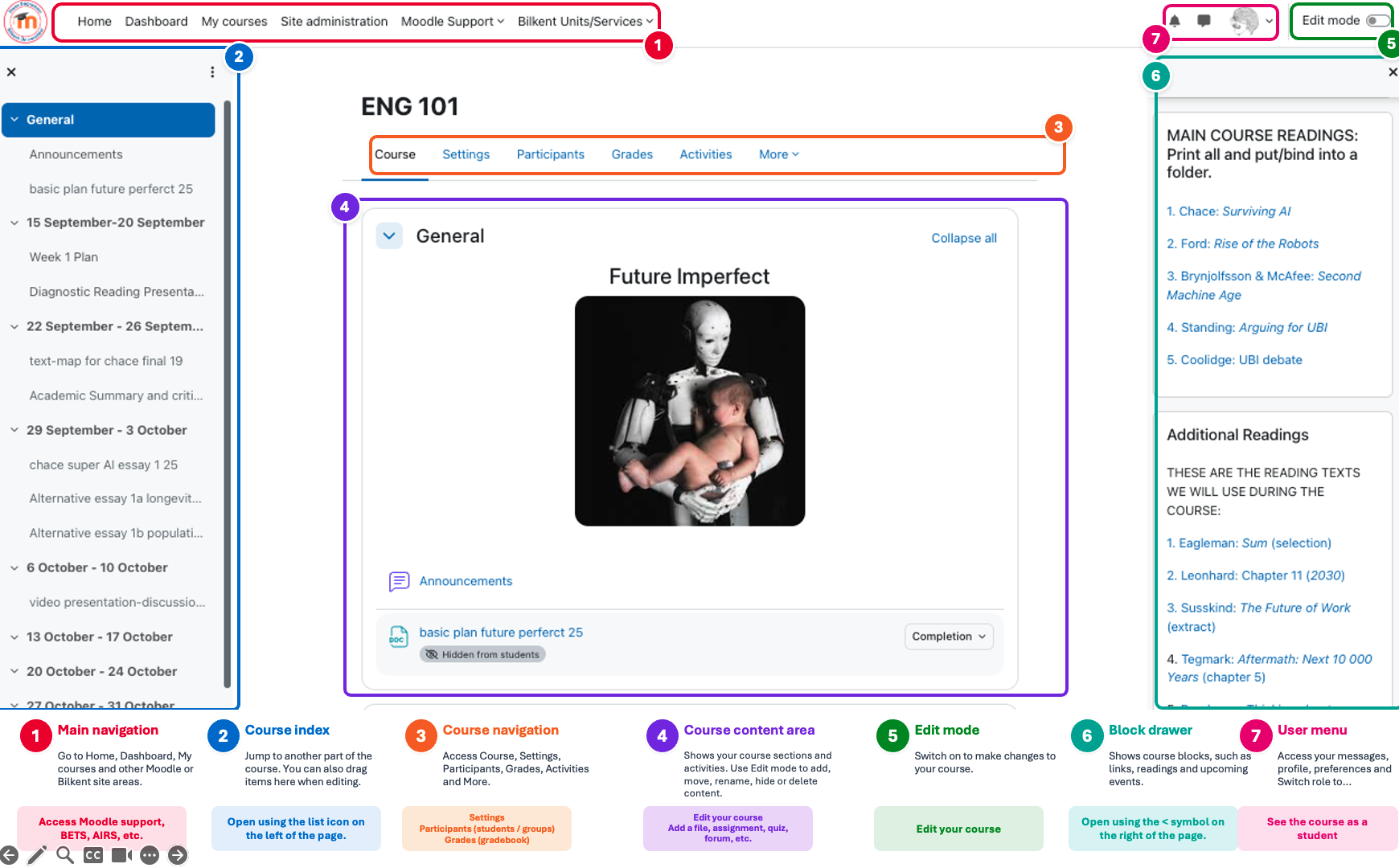
The first thing you’ll notice is the new Moodle layout.
At the top of the page, the main navigation gives you access to areas such as Dashboard and My courses. When you enter a course, course navigation provides access to Settings, Participants, Grades and other course tools.
A major addition is the Course index on the left. This provides an outline of all the sections and activities in your course. You can use it to jump quickly to a particular part of the course.
Can’t find something? If a Moodle 3.11 option seems to have disappeared, check the course navigation and the More menu. Most features have moved rather than disappeared.
🔎 Where do I find…?
| I want to… | Moodle 5.1 |
|---|---|
| Edit my course | Switch Edit mode on (top right) |
| Change course configuration | Course navigation → Settings |
| See students / enrolments | Course navigation → Participants |
| Manage groups | Course navigation → Participants |
| Open the gradebook | Course navigation → Grades |
| Add a file, assignment, quiz, forum, etc. | Edit mode → Add an activity or resource (+) |
| Manage quiz questions | Course navigation→ More → Question banks |
| Jump to another part of the course | Course index |
| See the course as a student | User menu → Switch role to… |
📖 See the Moodle 5.1 Course homepage
🎨 2. Choosing a course theme
The default theme in Moodle 5.1 is Boost, which uses Moodle’s modern navigation and interface.
Other themes are also available on Bilkent Moodle:
- Classic provides a more traditional Moodle layout. If you are more comfortable with the interface of older Moodle versions, Classic may make the transition easier.
- Moove is also available, as it was on Moodle 3.11, providing an alternative modern interface.
- Boost Union is based on Boost but provides considerably more options for customising the appearance and layout of a course.
If you would like to use one of these themes for your course, contact moodle@bilkent.edu.tr.
✏️ 3. Editing your course
Instead of the old Turn editing on button, Moodle 5.1 has an Edit mode switch at the top of the page.
Switch it on to add, rename, move, duplicate, hide or delete course content.
You can drag activities and sections around the course page, and the Course index also makes it easier to navigate and reorganise long courses.
Add an activity or resource now opens the redesigned Activity chooser, which groups the tools available to you and makes it easier to find the activity you need.
📖 Course editing — Moodle 5.1 Docs
☑️ 4. Activity completion and student progress
Moodle now makes activity completion requirements much more visible to students.
You can specify what students need to do to complete an activity: for example, view a resource, make a submission, receive a grade or achieve a particular result.
Students can then see their requirements and progress directly in the course.
This means it is worth paying more attention to Completion conditions when setting up activities: these settings now play a much more visible role in guiding students through a course.
📖 Activity completion — Moodle 5.1 Docs
📚 5. Organising your course
The new Course index makes the structure of your course much more visible.
Clear section and activity names are therefore especially helpful. For example, instead of several resources simply called Reading, names such as Week 3 – Hobbes reading make it much easier for students to navigate the course.
Course-wide configuration options can now be found under Settings in the course navigation.
📖 Course index — Moodle 5.1 Docs
📝 6. Assignments, quizzes and grading
Assignments and the gradebook should still feel familiar, although their screens and controls have been improved.
There is a more significant change if you use Moodle quizzes and Question banks.
Moodle 5.1 has a new Question bank structure designed to make questions easier to reuse and share. A course can now have multiple question banks. Questions from older courses are preserved during the upgrade, but you may find them organised differently.
If you use Moodle quizzes extensively, we recommend taking a little time to become familiar with the new Question banks.
📖 Question banks — Moodle 5.1 Docs
🤖 AI and other new possibilities
Moodle 5.1 includes support for AI integration, allowing external AI services to be connected to Moodle and made available through supported Moodle tools. AI integration is not currently enabled on Bilkent Moodle, but it is one of the possibilities opened up by the new version.
Moodle can also be extended with a large range of plugins and integrations providing additional activities, resources and other teaching tools.
If there is a feature, Moodle plugin or AI functionality that you think would be useful for your teaching, please send your suggestion to moodle@bilkent.edu.tr. We will be happy to investigate whether it can be made available.
📖 AI subsystem — Moodle 5.1 Docs
🎓 Want to learn more?
Already familiar with Moodle?
Moodle Academy has a free What’s New in Moodle 5.1 course designed specifically for existing Moodle users. It includes Moodle HQ’s introduction to the new features in Moodle 5.1. You can skip sections intended for administrators.
Moodle Academy: What’s New in Moodle 5.1
New to Moodle?
📖 Teacher quick guide — Moodle 5.1 Docs
Moodle Academy provides free Moodle training. Its Introduction to Moodle gives a short introduction to the platform, while the Moodle Teaching Basics programme provides more comprehensive training for teachers.
👍 Don’t panic!
Although Moodle 5.1 looks very different from Moodle 3.11, the basic way Moodle works has not changed.
Your courses still contain sections, resources and activities. Assignments still collect student work, quizzes still contain questions, and grades still go into the gradebook.
Once you become familiar with the new navigation, Course index and Edit mode, Moodle should start feeling familiar again.
If you have questions or problems with Bilkent Moodle, contact moodle@bilkent.edu.tr.
Best wishes and happy Moodling,
Moodle @ Bilkent