To access Moodle for your current semester courses, you must be registered on STARS as a student on a Bilkent course, and you must create an account and enrol in each course via SRS.
You can access SRS via the STARS webpage.
- Log in to your SRS account using your Bilkent student ID and your SRS password
- Go to the “Other Services” menu (for departmental students) or the “PREP” menu (for English preparatory students) at the top of the page and select the “Moodle” option
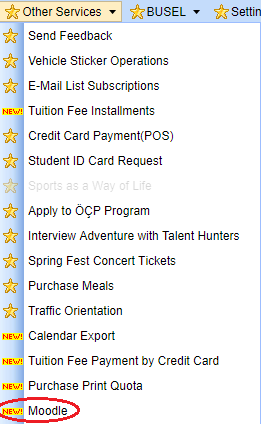
To enrol on a Moodle page for a course, do the following. You must repeat the process below for each of your courses that has its own Moodle page.
1. On the “Your Courses” list, click the green “Enrol in Moodle Course” button next to the course you need to enrol in. (N.b., you will only see this button if your instructor has created a Moodle page for the course and made it available)
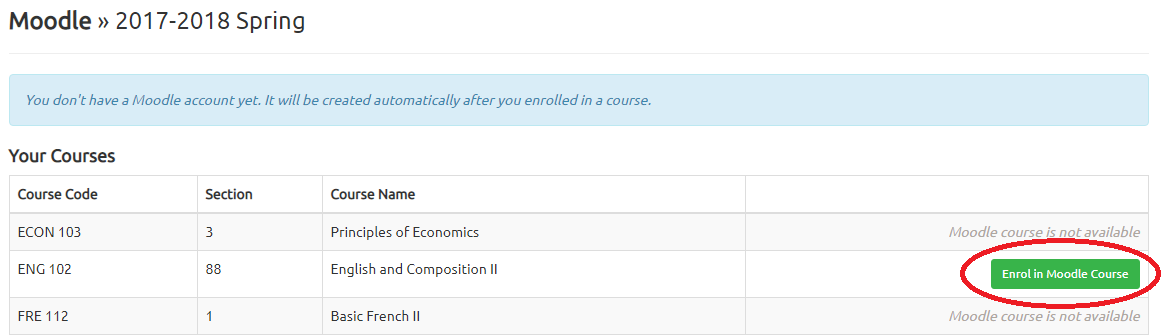
2. Your browser will ask you if you are sure you want to enrol. Click “OK” to confirm.

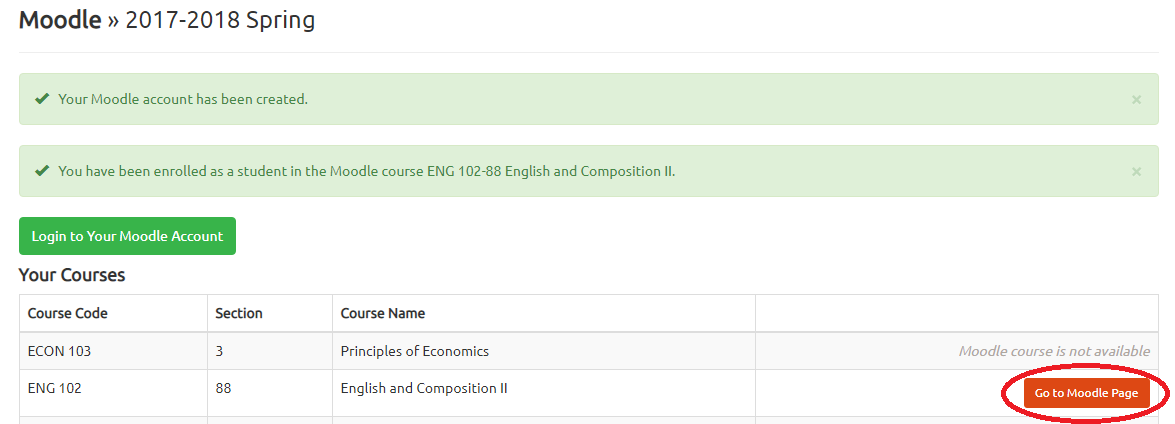
3. Once your request is processed, your STARS Moodle screen will show confirmation messages that:
- your account has been created (if this is your first Moodle enrollment)
- that you have been enrolled in the Moodle page for your course.
Now you can:
- click the red “Go to Moodle Page” button to access the course Moodle page you just created
- click the green “Login to Your Moodle Account” button to go to your account dashboard, for an overview of your progress of all your Moodle pages
Remember, you must repeat steps 2-4 for each and every one of your courses that have a Moodle page. 🙂
Troubleshooting
Notes
When you create your account via SRS, your Moodle account is created with the following details:
- Your username is the same as your Bilkent ID number; i.e., your student number.
- Your password is a random one generated the first time you log in to Moodle through SRS.
You do not need to know your Moodle password as long as you log in to the Moodle service through SRS.
You can also log in to the moodle site directly via the login page, but you will have to reset your password.